Rain Gauge & Dark Sky Tech
Hyperlocal Weather AppWeather
3.91.87K Reviews
- Version
- Varies With Device
- Installs
- 100.00K
- Age Rating
- Everyone
Screenshots
Our Review of Rain Gauge & Dark Sky Tech
 Analysis by Appyee
When it comes to weather apps, you might think you’ve seen it all. But then I stumbled upon Dark Sky Tech & Radar Forecast, and let me tell you, it’s like having a personal meteorologist in your pocket. This app is a game-changer for anyone who needs to stay ahead of the weather.
What I value most in a weather app is not a flashy screen but a quick, sensible answer to a practical question: should I leave now, take a jacket, or change my plans? This one is aimed at that kind of everyday checking. Its focus on hyperlocal weather and radar makes it most appealing when conditions may vary across nearby neighborhoods, rather than when you only want a broad forecast for a city.
Quick checks and sensible expectations
The name points to Dark Sky technology, while the app’s store summary describes an evolution of that approach powered by Apple’s WeatherKit. That background sets an expectation of detailed, location-focused forecasts, but I would still treat any weather prediction as guidance rather than a promise. Rain can miss one street and hit the next, and a forecast is only useful when it reflects the place and time you care about.
For a fast check before walking the dog or heading to a bus stop, a focused forecast can be more useful than a long list of regional headlines. I’d open it, look at the immediate conditions and radar, then decide whether to take an umbrella or allow extra time. That’s a better use of minute-level weather information than repeatedly refreshing it in the hope of eliminating uncertainty.
The User Experience
First off, let's talk about the user interface. It’s sleek, intuitive, and downright gorgeous. The moment you open it, you’re greeted with a minimalist design that’s easy on the eyes. No clutter, no unnecessary buttons—just the info you need, right where you need it.
Navigation is a breeze, literally. Swiping through forecasts feels smooth, and accessing different features is as simple as a tap. I found myself checking the app multiple times a day, not just because the weather can be unpredictable, but because it’s just so dang enjoyable to use.
That easy access matters most when I’m in a hurry. A forecast app should help me make a decision without turning a quick glance into a research session. For a commute, I’d check the likely conditions around departure time, then use the radar to see whether a shower is approaching or already moving away. For a longer outing, I’d look beyond the immediate moment and make a plan that can tolerate a change in the forecast.
Features That Stand Out
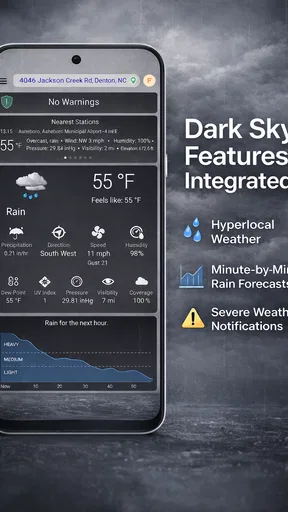
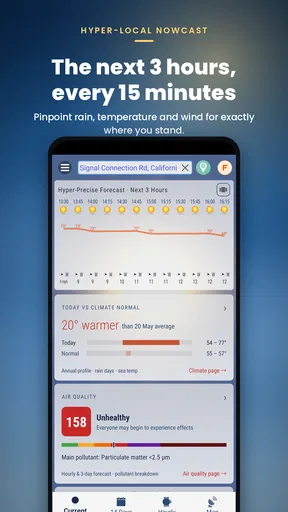
What really sets Dark Sky Tech & Radar Forecast apart is its hyper-local forecasting. We’re talking minute-by-minute updates that are frighteningly accurate. It’s perfect for those "do I need an umbrella?" moments when you’re heading out the door.
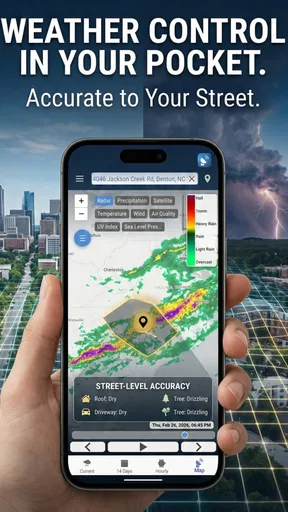
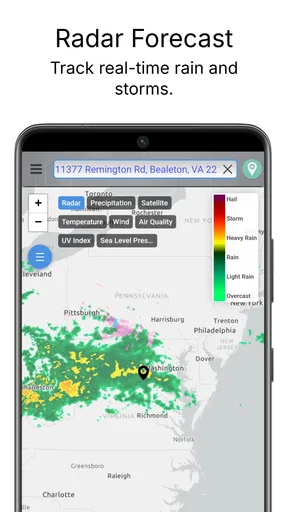
Not to mention, the radar feature is top-notch. You can zoom in and out to see weather patterns across your area or even the entire country. The animations are smooth, and the detail is impressive. It’s like having a live weather map in your hands.
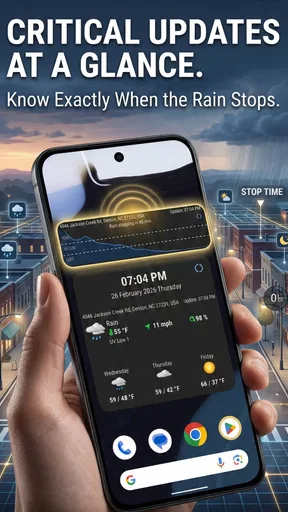
Another nifty feature is the notifications. You can set them up to alert you about rain, snow, or any severe weather changes. I’ve never felt so prepared for a sudden downpour!
A useful way to combine those tools is to use alerts as a prompt, not as a substitute for judgment. If a rain notification arrives before a walk, I’d check the radar and decide whether to postpone, take a covered route, or simply bring a shell. If I’m planning several hours outside, I wouldn’t rely on a single alert: I’d check again before leaving, because weather can evolve and a phone notification can arrive when I’m unable to act on it.
Radar is also most valuable when I use it to answer a specific question. A wide view helps me see the direction and spread of a weather system; zooming in can help with the local timing, but shouldn’t be mistaken for certainty at street level. For a day trip across a large region, a broader forecast from a conventional weather service may be easier to interpret than repeatedly tracking one small patch on the map.
Customizability and Personalization
One of the things I love is the customization options. You can tailor the app to show you what matters most—whether it’s temperature, wind speed, or humidity. You can even change the units to match your preference, making it super user-friendly no matter where you are in the world.
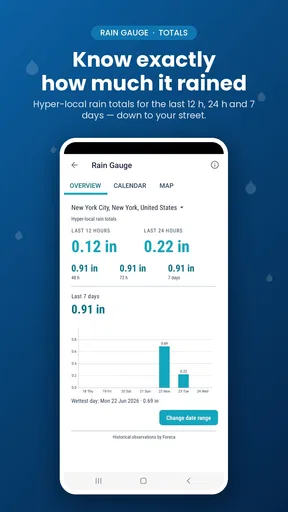
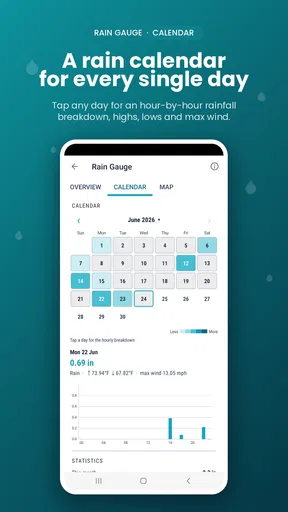
If you’re a stats geek like me, you’ll appreciate the detailed breakdowns. The app offers insights into daily and weekly trends, so you can plan your activities accordingly. It’s like having a weather journal without the hassle of writing it yourself.
I’d set the display around the decision I make most often. If I cycle or walk, wind may matter as much as temperature; if I’m choosing what to wear, temperature and humidity can be more immediately useful. Keeping the relevant details easy to see saves time and makes the forecast less overwhelming. For a trip, switching units to what I’m comfortable with is a small but practical step that helps avoid mental arithmetic when I’m already juggling directions and timing.
Weekly patterns are best treated as planning context, not a fixed promise for a particular hour. I might use the outlook to choose which day seems more suitable for a picnic, then check closer to the event before inviting people or packing. That distinction is one reason detailed weather apps can be helpful without making every plan dependent on a prediction: use the longer view to compare options, and the near-term view to make the final call.
Performance and Reliability
In terms of performance, this app is rock solid. It loads quickly, and I haven’t experienced any crashes or glitches. The data syncs seamlessly, ensuring you’re always getting the most up-to-date info.
Battery consumption is another win. It’s surprisingly gentle on your device, so you can keep those updates coming without worrying about draining your battery.
My practical expectation is that a weather app should feel responsive during a short check, but speed can depend on the phone, connection, and the amount of information being loaded. If a map takes a moment to appear, I’d use the basic forecast first rather than waiting on the visual detail before making a simple decision. That keeps the app useful even when I’m on a slow connection or trying to leave the house quickly.
For heavier use—switching between forecast views, checking radar repeatedly, and keeping alerts enabled—the sensible trade-off is to pay attention to how the app behaves on your own device. Weather information often needs a connection to stay current, and frequent map use is a different habit from opening the app once in the morning. I wouldn’t assume that every phone will have the same battery experience; if power is low, I’d check what I need, then close the app rather than keeping it open while I’m out.
Reliability also means knowing how to recover when something looks stale or incomplete. I’d first check whether the phone has a working connection and whether the selected location is the one I meant to view, then reopen the forecast. If the radar and the written forecast seem at odds, I’d compare their time frames instead of treating that difference as proof that one is broken. Radar shows precipitation patterns, while a forecast summarizes expected conditions; they can be useful together without matching perfectly at every moment.
Who will get the most from it
I’d recommend this app to people who make frequent local decisions around changing weather: commuters, dog walkers, parents planning a park visit, and anyone who wants to check rain timing before stepping outside. A realistic example is a walk home after work: I’d glance at the forecast before leaving, use radar to see whether rain is moving toward my route, and decide whether to carry an umbrella or wait a little. That’s a focused workflow, not a guarantee that every drop will be predicted exactly.
It may be less suitable if you only want a simple temperature and a broad weekly outlook. In that case, the weather panel already built into a phone or a basic forecast app may be quicker and easier to live with. Likewise, people who need detailed specialist information for a particular activity should compare the available forecast details with the needs of that activity rather than assuming a hyperlocal focus covers every use case.
How it fits alongside other weather apps
Compared with the usual general-purpose weather apps, this one’s appeal is its emphasis on local timing, radar, and alerts. A standard app can be perfectly adequate for checking whether tomorrow looks warm or cold; the extra map-oriented approach is more useful when I’m deciding whether to leave now or wait for a shower to pass. On the other hand, someone who prefers a compact forecast with fewer choices may find a simpler alternative more comfortable.
I’d use it as a decision aid, not as my sole authority for high-stakes plans. For a routine commute, a short-term rain check is practical. For a long drive, outdoor event, or activity where changing conditions could create risk, I’d check the forecast again near departure and use appropriate official guidance when needed. No interface can make uncertain weather certain, and a clean presentation should not encourage overconfidence.
Availability and the value question
Hyperlocal Weather App is the developer behind this free weather app, which is rated for Everyone and has reached over 100,000 installs. It has an average rating of 4.2 from around 7,700 ratings, alongside roughly 1,800 written reviews. Those figures suggest a real audience, but I’d still judge it by whether its location-focused view and radar suit my routine rather than treating popularity as proof that it is the best choice for everyone.
The current version is called Altocumulus, and the app requires Android 8.0 or later. It is free to install, with in-app purchases ranging from $9.49 to $23.99 per item. I’d start by deciding whether the free experience gives me the forecasts and checks I actually need before considering any purchase. If I only open a weather app occasionally, paying for extra options may not make sense; frequent users should weigh the value against how much they rely on the app’s particular tools.
Final Thoughts
Overall, Dark Sky Tech & Radar Forecast is a must-have for anyone who takes their weather seriously. It’s reliable, feature-packed, and incredibly easy to use. Whether you’re planning a weekend hike or just trying to dodge a rainstorm, this app has got you covered.
If you haven’t already, give it a try. You might just find yourself checking the weather more often than you ever thought possible. And hey, being prepared never goes out of style!
Verdict
Strengths of Rain Gauge & Dark Sky Tech
- Accurate and hyper-local weather predictions.
- User-friendly interface with intuitive navigation.
- Detailed radar maps with real-time updates.
- Customizable notifications for severe weather.
- Minimalistic design for quick information access.
Limitations of Rain Gauge & Dark Sky Tech
- Requires a subscription for premium features.
- Limited customization for radar layers.
- Battery consumption can be high with GPS on.
- Occasional delays in weather alert updates.
- No offline mode for weather data access.
Similar Picks in This Category
View All
Weather - By Xiaomi
Xiaomi Inc.4.1

Weather & Radar Forecast
WetterOnline4.8

Weather
OneLouder Apps4.6

AccuWeather: Weather Radar
AccuWeather3.6

The Weather Channel - Radar
The Weather Channel4.6

1Weather Forecasts & Radar
OneLouder Apps4.3
Frequently Asked Questions
What features does Dark Sky Tech & Radar Forecast offer?
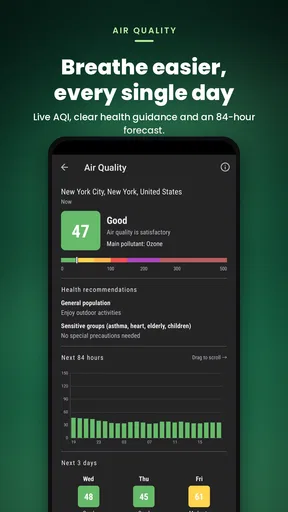
Dark Sky Tech & Radar Forecast offers hyper-local weather updates, providing minute-by-minute predictions. It includes interactive radar maps, severe weather alerts, and detailed 7-day forecasts. The app is designed to give users precise weather conditions based on their location, making it a go-to tool for planning daily activities.
Is Dark Sky Tech & Radar Forecast available on both Android and iOS?
Yes, Dark Sky Tech & Radar Forecast is available for both Android and iOS platforms. Users can download the app from the Google Play Store or the Apple App Store. It ensures that users across different devices can access accurate and timely weather information.
Does the app provide real-time weather alerts?
Yes, the app provides real-time weather alerts for severe conditions. Users receive notifications for thunderstorms, tornadoes, or heavy rain, allowing them to stay informed and take necessary precautions. The alerts are based on user location settings, ensuring they are relevant and timely.
Is there a cost associated with using Dark Sky Tech & Radar Forecast?
Dark Sky Tech & Radar Forecast offers a free version with basic features. However, for advanced features like ad-free browsing and detailed forecasts, there is a premium subscription option. This allows users to choose based on their needs and budget when accessing the app's functionalities.
How accurate is the weather data provided by the app?
The app uses advanced algorithms and data sources to ensure high accuracy in its weather predictions. It is renowned for its precision in short-term forecasts, often updating weather conditions by the minute. Users can rely on it for planning outdoor activities with confidence in its accuracy.
